How does a made to order shop handle inches and centimetres for US and UK shoppers on the same Shopify product?
Since 1 July 1959 an inch has been exactly 25.4 millimetres. That is the easy part. The hard part is a shop in Leeds with customers in Texas, or a shop in Ohio with customers in Kent, selling an awning whose price depends on a size that one customer measures in centimetres and the other in inches, on the same product page, at the same time.
How does a made to order shop handle inches and centimetres for US and UK shoppers on the same Shopify product?
Keep one product, one price list and one set of rules, and let the shopper choose the unit on the page. The size fields, the limits under them and the drawing all switch between centimetres and inches, the typed size is converted once, exactly, and the price is looked up in your list as it always is. Nothing is duplicated. Inchy, a Shopify app for made to measure products, does this with a cm and in switch on the page, and records the size on the order in the unit the shopper used.
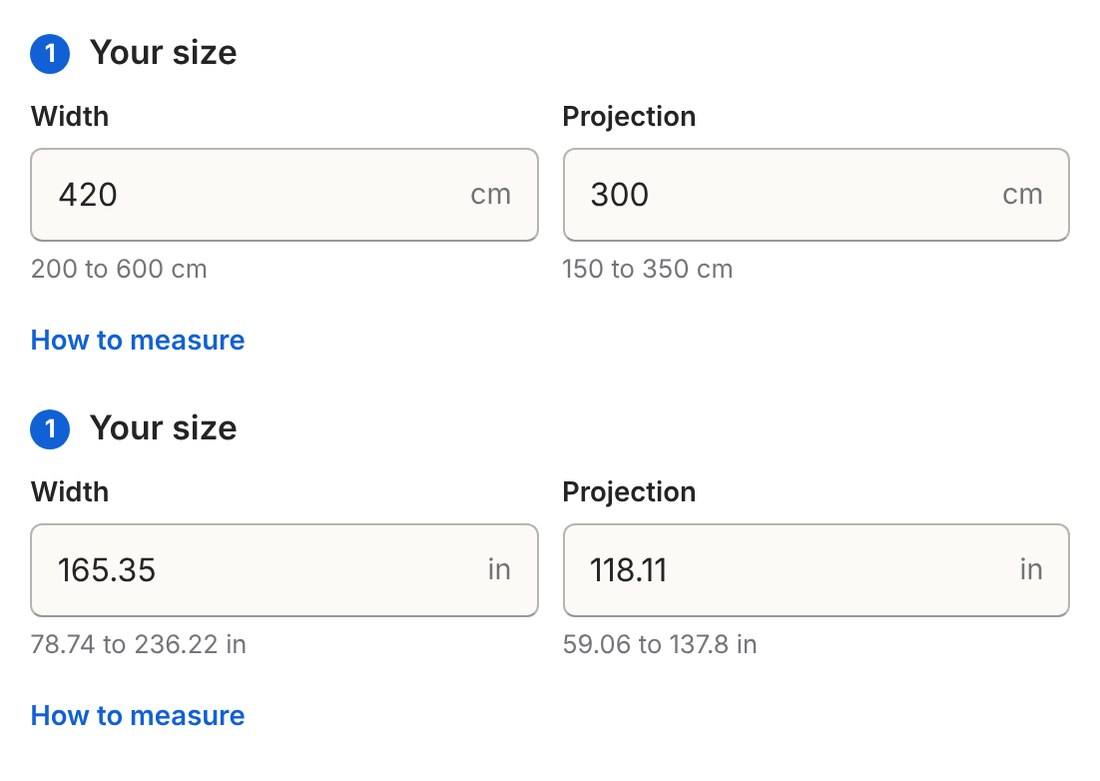
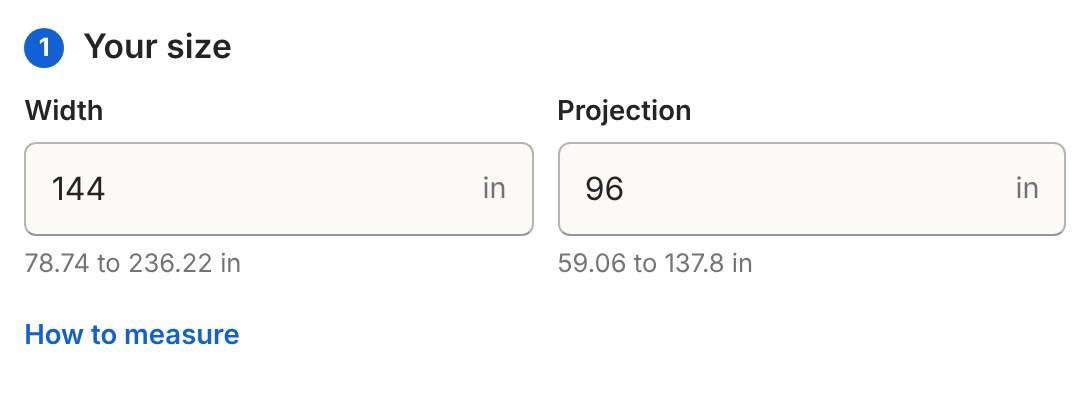
The same size step in the live demo, in centimetres and then in inches. The limits convert with the fields.
Why not make two products?
Because you would then have two price lists, two sets of options and two places to make a mistake, and a shopper from the wrong country would still land on the wrong one through Google. A shop with twenty awnings would run forty products. Shopify already allows up to 2,048 variants and three options per product, and made to measure sizes do not fit in variants in any unit, so the duplication buys nothing. One product with a unit switch is less work and fewer errors.
There is also the question of which unit is the real one. For a made to measure shop the answer is whichever your workshop cuts in. In the UK that is millimetres or centimetres. In the US it is inches and fractions. The page should take the shopper's unit and give the workshop its own.
How should the conversion work?
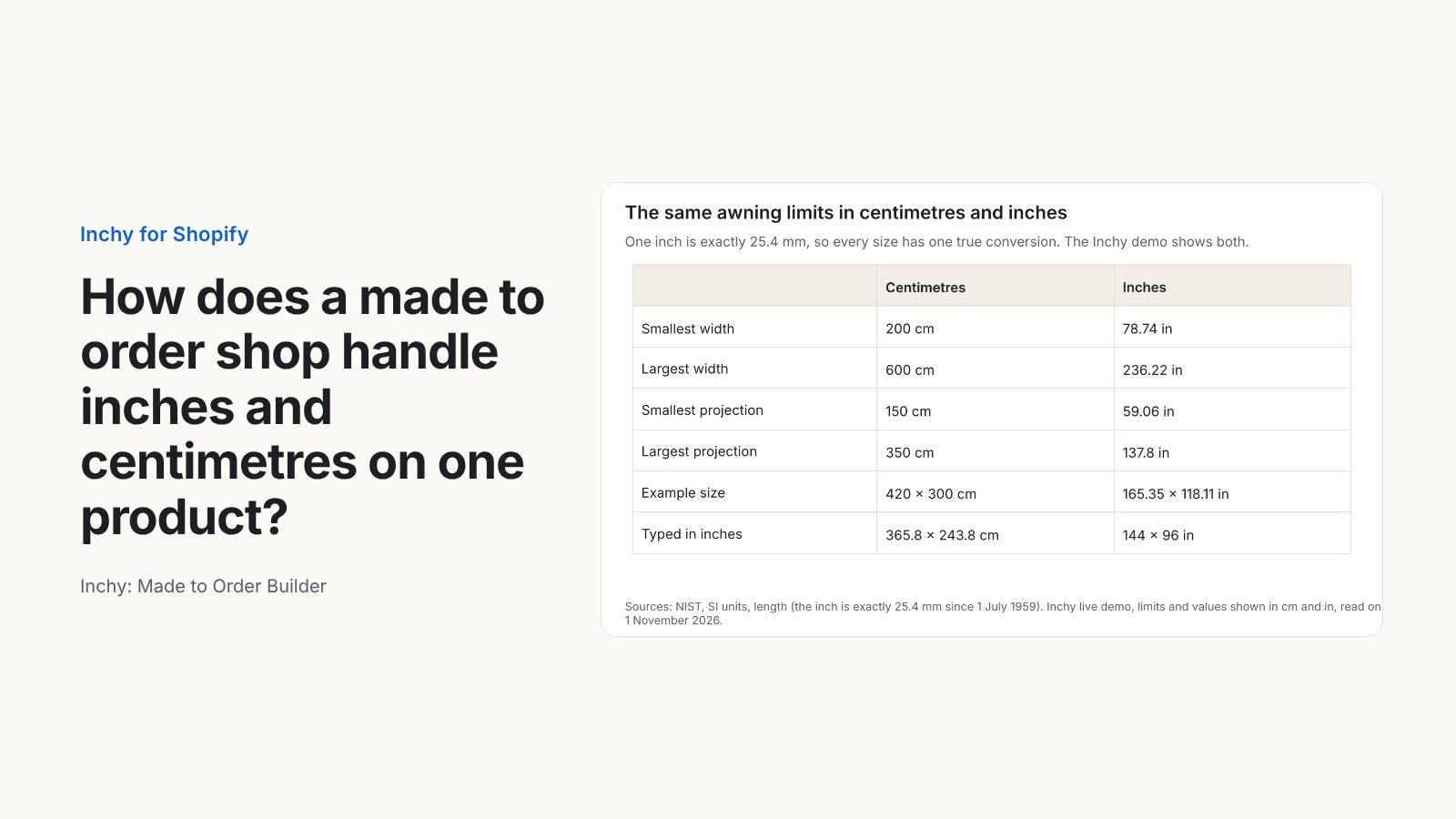
Exactly, in one direction, once. Because the inch is defined as 25.4 mm, there is one true conversion for every size and no rounding argument. In the demo, 420 cm reads 165.35 in and 300 cm reads 118.11 in when the switch is flipped. The limits convert too: 200 to 600 cm becomes 78.74 to 236.22 in, and 150 to 350 cm becomes 59.06 to 137.8 in.
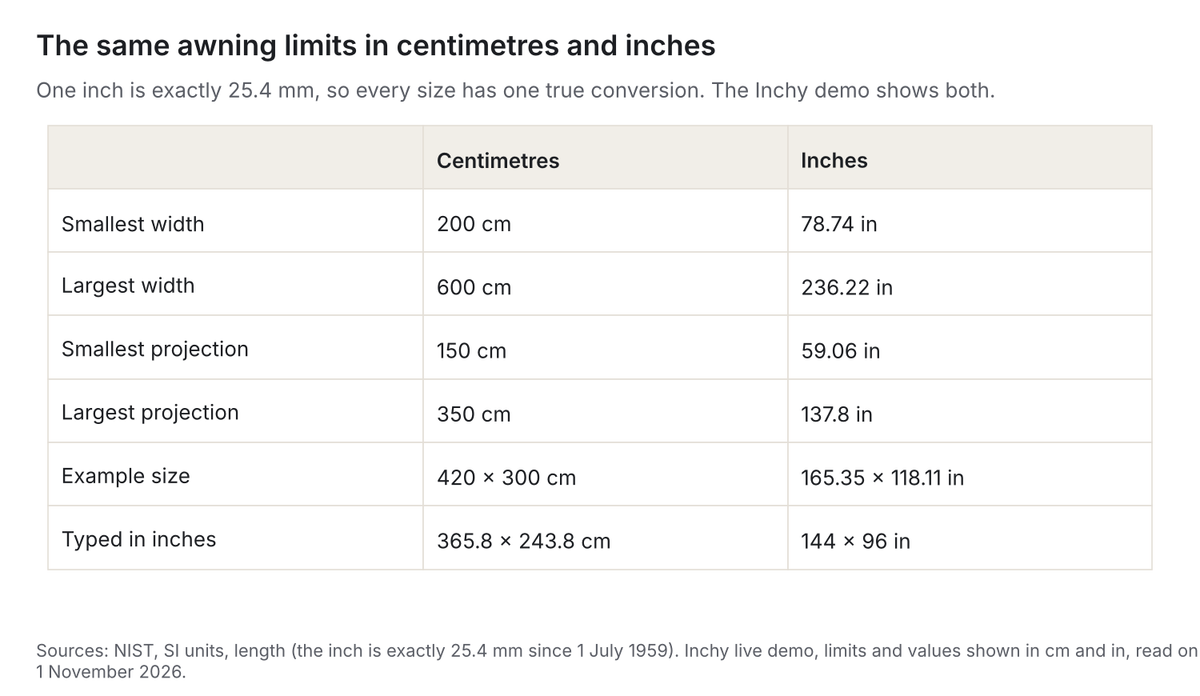
The price is looked up after the conversion, in the unit of your list. A US shopper who types 144 by 96 inches is buying a 365.76 by 243.84 cm awning. In the demo grid that falls in the 400 cm column and the 250 cm row, and with a navy stripe cover and a motor the total is £1,679.95. The shopper never sees the centimetres unless they flip the switch, and the grid never sees inches. How to sell made to measure awnings and charge the exact price for each size explains how the grid is read.
What does the workshop get?
The size in the unit the shopper typed, and the unit written next to it, so nobody cuts 144 cm for a 144 inch order. The order summary in the demo reads "144 × 96 in" for the inch order and "420 × 300 cm" for the centimetre one. The production sheet carries the same line. If your workshop wants everything in millimetres, convert on the sheet and keep the shopper's number beside it, so a query from the customer can be answered in their own unit.
Rounding is the one place to be careful. A grid in 10 cm steps does not care whether the shopper typed 165.35 in or 165.4 in. A price per square metre does, by a few pence. Decide whether you round the converted size to the nearest millimetre before pricing, and do it the same way every time.
Which unit should the page start in?
The one most of your shoppers use, with the switch next to it. A UK shop starts in centimetres. A US shop starts in inches. A shop selling to both can start in the unit of the store's main market and rely on the switch; it sits at the top of the drawing in the demo, where a shopper looking at the ruler will see it. Decimal inches are simpler to type than fractions, and the demo uses them, so the limit reads 236.22 in rather than 236 and 7/32.
In the UK there is a small legal point for the labelling of goods. Trading standards guidance published on Business Companion says an imperial indication may be shown alongside a metric one as a supplementary indication, but it must not be more prominent than the metric indication. For a shop selling to UK consumers, that argues for centimetres first with inches as the option, which is how the demo is set.
What about the price in dollars and pounds?
Units and currencies are separate problems and should be solved separately. Shopify Markets lets a store show prices, take payment and refund in the shopper's local currency, converted automatically at the current rate or at a rate you set manually, for stores using Shopify Payments. Inchy prices in the store's currency and shows the total in the shopper's currency the way the rest of the store does. The price rule stays in one currency, your own, and the conversion happens after it, the same way the size conversion happens before it.
One thing to watch: a converted price is rounded by Shopify per market, so the shown total in a second currency can differ by a few cents from a straight conversion. Why checkout prices can differ from the product page covers how Inchy keeps the page and the checkout equal.
Questions and answers
Can the shopper type millimetres?
Yes. Sizes can be set in centimetres, millimetres or inches, per product.
Can my price list be in inches?
Yes. The grid of widths and projections can be in centimetres or inches. Paste it in the unit you quote in, and the conversion runs from the shopper's unit to the list's unit.
Does the "How to measure" note change with the unit?
The note is yours to write. If you sell in both units, write the measurement in both: "Leave 15 cm (6 in) clear at each side for the brackets."
What does it cost?
Anything priced by size is on the Made to measure plan at $99 a month, with unlimited products, every look and style and Bundle kits, billed by Shopify with no fee per order. There is a 7-day free trial.
Who makes Inchy?
InterioApp. We have priced and sold made to measure products since 2011, in our own shop first, and our quoting software and calculators are used by made to measure businesses in the UK, Europe, Australia and New Zealand.
Flip the switch on the demo, type a size in inches, and check that the price is the one your grid would give. See Inchy and try the live builder. Start the 7-day free trial on the Shopify App Store.
Sources
- NIST, SI units, length: the inch, derived from the yard effective 1 July 1959, is exactly 25.4 mm.
- Business Companion (Chartered Trading Standards Institute), Units of measurement: imperial units as supplementary indications must not be more prominent than the metric indication.
- Shopify Help Center, Selling in multiple currencies: local currency prices, payment and refunds; automatic conversion or manual rates; for stores using Shopify Payments.
- Shopify Help Center, Rounding prices: converted prices are rounded per market.
- Shopify Help Center, Adding variants: up to 2,048 variants and up to three options per product.
- Inchy live demo: limits and sizes in cm and in, 144 × 96 in at £1,679.95 and the order summary, read on 1 November 2026. 365.76 and 243.84 cm worked out from 144 and 96 inches at 2.54 cm each.
Written with AI. Every figure is checked against the sources listed above.
1reading
Written by
 Inchy: Made to Order Builder for ShopifyShopify app21 pieces · 10 followers
Follow Inchy: to see new posts in your feed, on your phone or by email.