How does a roller blind price grid work in a Shopify calculator?

How does a roller blind price grid work in a Shopify calculator?
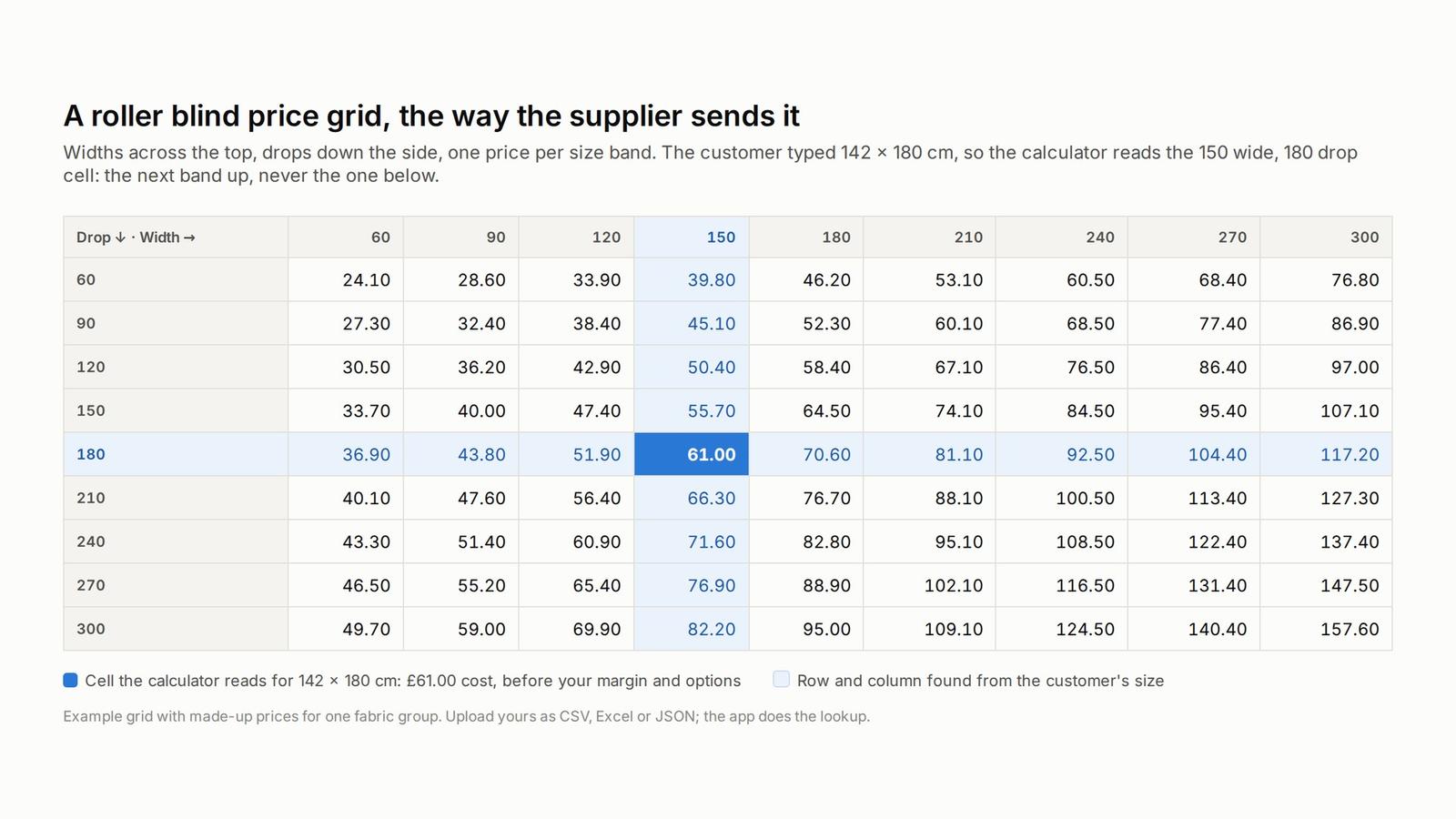
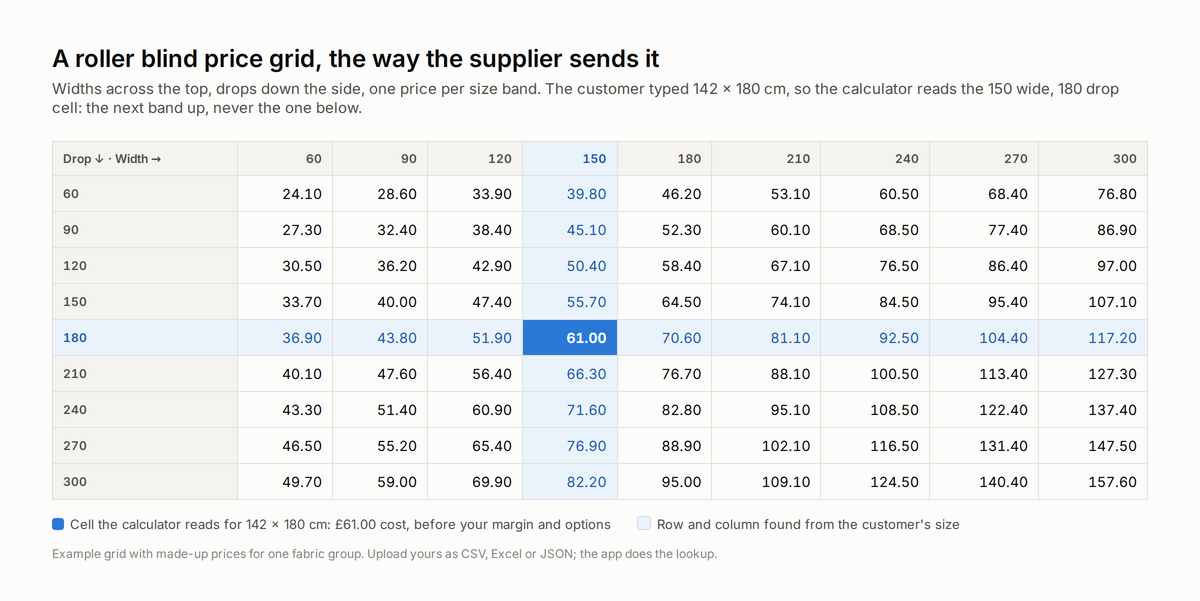
A price grid is a table with widths across the top and drops down the side, and each cell is the price for every blind that falls inside that size band. When a customer types 142 cm wide by 180 cm drop, the calculator finds the first width column that is 142 or more, which is 150, and the first drop row that is 180 or more, which is 180, and reads the cell where they meet. In the app that cell is added to the product's base price in Shopify, the options the customer picked go on top, and she sees the total. In Curtain and Blind Calculator you upload the grid as a CSV, an Excel file or JSON, one per fabric group, and the lookup happens on the product page in real time. Nothing is calculated by formula. It is read from your table, the same table your supplier sent you.
Why a table and not a formula?
Because that is how the trade prices blinds, and for good reasons. A roller blind is a tube, two brackets, a chain mechanism and a piece of fabric, and each of those comes in steps. A 25 mm tube works up to a certain width, then you need a 32 mm tube, then a 38 mm one. The fabric comes on rolls of a fixed width, so a blind wider than the roll needs the fabric turned, or is simply not possible. The result is that the cost does not rise smoothly with size, it jumps at the points where the components change, and a table captures those jumps where a formula smooths them out and gets the price wrong at exactly the sizes where the margin is thinnest.
The second reason is simpler. Your supplier gives you a table. If the app used a formula, somebody would have to turn the table into a formula and check it against every cell, and they would have to do it again in January when the new price list arrives. Uploading the table as it is takes minutes and there is nothing to check except that the file loaded.
What does "next band up" mean and why does it matter?
It means a size that falls between two columns is priced at the larger one. 142 cm is priced as 150 cm, not 120 cm. Every supplier prices this way, because the blind is made from the larger component set, and a calculator that rounds down instead loses money on almost every order without anyone noticing. This is one of the rules that a spreadsheet built in an afternoon usually gets wrong, and it is the first thing we check when a retailer sends us a calculator somebody else built. If a ChatGPT-generated calculator prices 142 cm at the 120 cm band, it looks fine on the screen and costs you the difference on every blind.
How do options and margin come into it?
In the app the grid works as an increment on top of the product's base price in Shopify, so the base price carries your minimum charge and the grid carries the size. Everything else is layered on top by rules you set in the app. A cassette headrail adds a fixed amount or a per-metre amount. A motor adds a fixed amount and is only offered above a minimum width. A chain side costs nothing but has to be recorded on the order. Your margin is built into the grid you upload, or added as a rule, whichever way you price in the shop. VAT goes on at the end for UK stores, and US stores can show prices before tax and let Shopify add sales tax at checkout.
The point is that the grid stays exactly as the supplier sent it, and your commercial decisions live next to it, not inside it. When the supplier changes prices you replace the grid. When you change your margin you change one number. The two never get tangled, which is what happens in most spreadsheets after a year.
How do you get the grid into Shopify?
You export it from the supplier's spreadsheet or PDF into a CSV or an Excel file with the widths in the first row and the drops in the first column, exactly as the grid reads on paper. You upload it in the app and attach it to the fabrics it applies to, so one grid can serve a whole fabric group and a premium fabric can have its own. Then you assign the calculator to the Shopify products and the product page starts pricing.
In practice, the work is not the upload, it is getting the price lists clean. A supplier PDF with a grid printed sideways, or a price list that mixes cost and retail, or a fabric book where half the fabrics have no grid, is where the time goes. We do this with retailers every week. Send the lists as they are and we sort them, because that is faster than explaining the format.
Does the same idea work for curtains and hardware?
For hardware, yes, and it matters more than people think. A curtain track, a pole or a headrail is cut to length and priced by length, usually in bands like a blind grid but with one dimension instead of two. The same upload and the same lookup apply. A retailer who lists a pole at a single price either loses money on the bay window or overcharges the small one.
For curtains, the grid is only part of it. Curtain prices come from the track width, the drop, the fullness, the number of fabric widths and the fabric price per metre, and that is a set of rules rather than a single table. We cover it in a separate piece this week.
What can AI do here, and what can it not?
AI is very good at helping you describe the calculator you want, drawing it on your product page and explaining to your team how the grid works. We use it for that on every project. What it should not do is decide a price. The grid comes from the supplier, the rules come from you, the lookup happens in the app, and a person checks the first orders against the paper price list. The picture can come from AI. The number has to come from your table.
Frequently asked questions
What file formats can I upload?
CSV, Excel or JSON, with widths across the top and drops down the side.
Can different fabrics have different grids?
Yes. One grid can serve a fabric group, and any fabric can have its own grid.
What happens when the supplier changes prices?
You upload the new grid. The margin, the options and the rules stay as they are.
Does it round up to the next band?
Yes. A size between two bands is priced at the larger band, the same way the supplier prices it.
Does it work in inches?
Yes. Grids can be in centimetres or inches, and the customer enters the units your store uses.
Yesterday's piece explains why the design can come from AI but the price cannot. The first piece on this page covers which Shopify app does this.
What does your current website do with a customer who types 142 cm, price it at 150, price it at 120, or ask her to email you?
1reading now
Watch & subscribe
Curtain & Blind Calculator also publishes on YouTube
1.24K subscribers
One click subscribes you on YouTube - you stay here on PUBlish.
Get an email when Curtain publishes